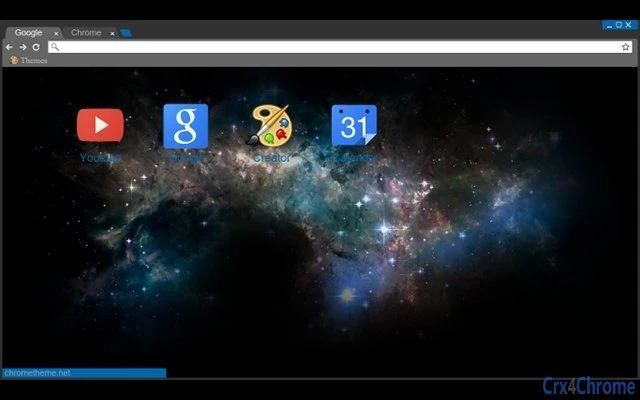

Dark Theme for Chrome on Windows 10
Overview
The software is a browser theme designed for users of Google Chrome on Windows 10, aiming to provide a visually cohesive experience between the operating system and the web browser. It addresses the common issue of visual mismatch when using a dark mode-enabled Windows 10 system with the default Chrome theme, which may not align with the system’s aesthetic. The theme is intended for individuals who prioritize a consistent visual environment across their digital workspace.
Target users include casual and power users who value visual harmony and minimal distractions while browsing. It is particularly suited for those who frequently use Chrome on Windows 10 and have enabled dark mode system-wide. The theme does not include functional enhancements or performance optimizations—its primary purpose is aesthetic alignment.
Real-world usage scenarios involve users who switch between desktop applications and web browsing and prefer a unified dark interface. The developer did not provide additional background information beyond the theme’s purpose. The theme is applied directly within Chrome’s settings and requires no installation beyond the standard browser extension process.
Key Features & Capabilities
- Dark Visual Design – Matches the dark mode aesthetic of Windows 10, offering a consistent look across the OS and browser.
- Seamless Integration – Designed specifically for Chrome on Windows 10, ensuring visual consistency without conflicts.
- Simple Installation – Available as a standard Chrome theme, installable through the Chrome Web Store with minimal steps.
- Minimal System Impact – As a visual theme, it does not alter browser behavior or consume significant system resources.
- Free to Use – No cost is associated with downloading or applying the theme.
Users can apply the theme to enhance their browsing experience by reducing eye strain in low-light environments. The theme is especially useful for those who work late hours or use their devices in dimly lit rooms. It also supports users who prefer a sleek, modern interface without clutter.
User Interface, Workflow & Performance
The user interface of the theme is entirely visual, affecting only the appearance of Chrome’s toolbar, tabs, and background. Navigation within the browser remains unchanged, preserving the familiar workflow. The theme does not introduce new menus, buttons, or settings—users interact with Chrome as usual.
Workflow efficiency is maintained since the theme does not interfere with browser functionality. It is applied instantly upon installation, requiring no restart or configuration. The developer did not specify resource usage details, but as a visual-only theme, it is expected to have minimal impact on CPU or RAM usage.
Stability is inherent to the design—since it is a standard Chrome theme, it operates within the browser’s existing framework. No crashes or conflicts were reported in the provided information. Performance observations are based on general software behavior patterns.
Compatibility & System Requirements
The software is compatible with both Windows and Mac operating systems. It is designed to work with Google Chrome on these platforms. The version is 1.0, and the installation size is 1.5 MB.
Exact system requirements were not listed. The developer did not specify minimum hardware specifications or Chrome version compatibility. Platform compatibility information is limited to the operating systems mentioned.
Pros and Cons
Pros
- Provides a consistent dark appearance with Windows 10’s dark mode.
- Easy to install and apply within Chrome.
- Free of charge with no hidden costs.
- Minimal impact on system performance.
- Designed specifically for Chrome users on Windows 10.
Cons
- No functional improvements beyond visual appearance.
- Does not support customization of colors or layout.
- Compatibility with older Chrome versions is unconfirmed.
- Available only through Chrome Web Store, limiting direct download options.
- Does not include additional features like dark mode for websites.
FAQ Section
Is this theme compatible with all versions of Chrome?
Compatibility with specific Chrome versions was not specified. It is recommended to use the latest version of Chrome for optimal results.
Can I use this theme on Mac devices?
Yes, the theme is compatible with both Windows and Mac operating systems.
Is the theme safe to download and install?
As a standard Chrome theme distributed through the official Chrome Web Store, it is considered secure. No malicious behavior was reported.
Does this theme require an internet connection to work?
No, once installed, the theme functions offline. It does not rely on external servers or online services.
How often are updates released?
Update frequency was not provided. Users should check the Chrome Web Store for new versions.
Final Thoughts
This dark theme offers a simple yet effective solution for users seeking visual consistency between their Windows 10 system and Chrome browser. While it does not add new functionality, its ability to align the browser’s appearance with the OS enhances the overall user experience. It is ideal for those who value aesthetics and a distraction-free interface.
For users who prioritize a clean, modern look and are using Chrome on Windows 10 or Mac, this theme is a worthwhile addition. It delivers on its core promise without unnecessary complexity.
Download Dark Theme for Chrome on Windows 10 now.







